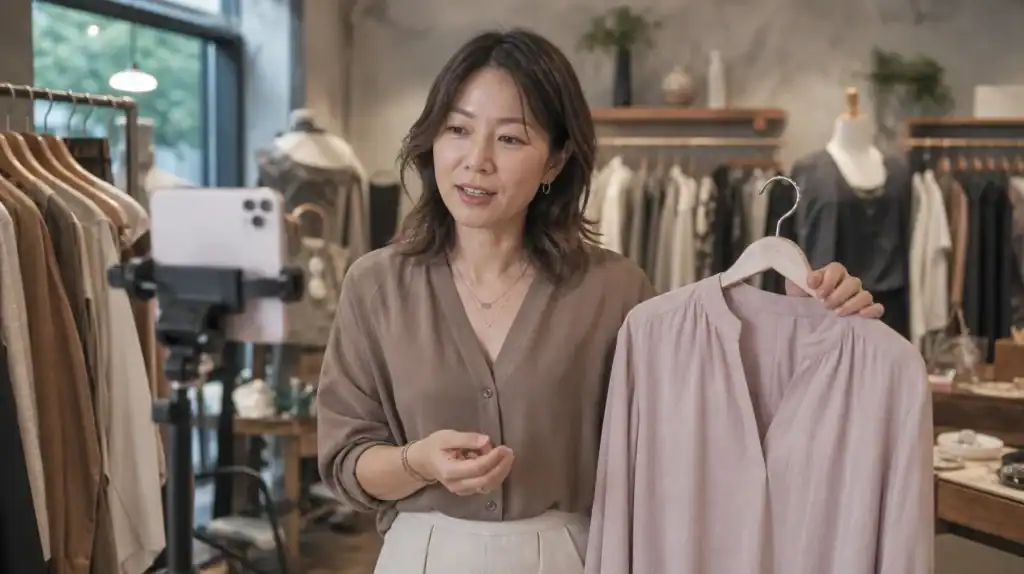

Live shopping is rapidly transforming the way e-commerce brands connect with their audience. The unique blend of livestream selling, real-time chat, and instant checkout creates a highly engaging shopping experience that drives conversions and captures impulse buys like never before. For Shopify store owners, integrating interactive video commerce can ignite engagement, increase sales, and provide a direct, real-time channel between you and your shoppers. However, executing a successful Shopify app integration for live selling takes more than just hitting “go live.” This step-by-step guide will help you seamlessly launch your first shoppable video event on Shopify, keeping the process focused on seller success. For the broader context on how live commerce is reshaping retail, see our live stream commerce guide.
Why live shopping drives engagement and sales
Traditional e-commerce offers convenience, but it lacks the excitement and interactivity consumers crave. Live shopping brings products to life in ways static images and product pages cannot match. By offering viewers an immersive look at your catalog alongside real-time chat and Q&A, you give them compelling reasons to buy instantly. See the conversion rate benchmarks for hard data on why this format outperforms.
The adoption of livestream selling is soaring worldwide. Sellers are discovering that shoppable videos shrink the gap from discovery to purchase, turning browsers into buyers with a single click. These events generate urgency, driving higher conversions and minimizing cart abandonment—a persistent challenge in online retail.
- Higher interaction rates compared to standard online stores
- Improved trust through real-time demonstrations and customer questions
- Opportunity to showcase multiple products interactively
- Valuable feedback loop via viewer comments and votes
Preparing your Shopify store for live shopping success
Before launching your first live shopping event, proper preparation ensures everything runs smoothly. Lay the groundwork by selecting the best live shopping software, optimizing your storefront, and preparing your team for on-camera selling. Attention to these details minimizes technical hiccups and maximizes your chance to drive sales. Our essential setup guide covers cameras, lighting, and streaming software in detail.
Prioritize usability for both staff and customers. Modern shoppers demand effortless navigation and instant access to product information within the live stream, plus a seamless path to checkout without leaving the video environment. That’s why many merchants turn to Buylive Shopify checkout integration for a truly frictionless experience.
Choosing robust live shopping software for Shopify
Picking the right live shopping software is critical. Ensure platform compatibility, smooth Shopify app integration, support for diverse product catalog integration, and built-in real-time chat. Your tool should offer 1-click transactions, display product info overlays, and maintain broadcast quality even under high traffic.
A strong requirement is deep product catalog integration, allowing hosts to feature any Shopify item instantly. Synchronize inventory, pricing updates, and order processing seamlessly between systems to avoid disruptions.
Optimizing your product pages and assets
Every product page featured in your live shopping event should have compelling images, updated descriptions, and accurate inventory data. Weak listings disrupt the buying journey and erode confidence. Focus on video-friendly product photos and thorough attribute lists for effective on-screen showcases.
Prepare exclusive bundles or limited-time offers highlighted only during live events. These strategies add urgency and motivate viewers to buy before the broadcast ends.
Building an engaging live shopping experience
Your brand’s first live shopping event sets expectations for future shows. Prioritize interactive features, thoughtful planning, and create shopping moments that feel personal and urgent to every viewer.
Unlike pre-recorded content, live presentations let hosts connect instantly with customers. Encourage open conversation and actionable questions throughout to boost participation and strengthen brand loyalty.
Scripting the show and training presenters
Spontaneity keeps things lively, but structure ensures your sales goals stay in focus. Prepare a concise event script outlining which products to demo, key benefits, and cue points for special offers. Hosts should rehearse responses to common objections and keep energy levels high throughout.
Coach presenters on camera presence—relatable hosts bring authenticity and prompt action when needed. Use visual cues or chat moderators to highlight priority products as required.
Integrating interactive features and real-time chat
The power of live shopping events lies in instant customer interaction. Activate real-time chat so viewers can ask questions, receive personalized recommendations, and signal buying intent—all inside the stream. Polls, product votes, and timed contests further drive engagement.
Appoint a back-end moderator to filter questions and ensure fast replies. Quick answers reduce hesitation and nudge undecided shoppers toward conversion.
Running your first live shopping event on Shopify: A step-by-step guide
Launching live shopping through your Shopify store requires precision and planning. Use this checklist to align every technical and creative aspect for maximum impact when you go live.
Start small if needed—focus on top-selling collections or flagship products—and scale up as you refine your approach and gain comfort with the technology.
- Install a compatible live shopping app and fully integrate it with your Shopify product catalog.
- Schedule your event and recruit a charismatic host who knows your offerings well.
- Prepare promotional assets, teasers, and email campaigns to alert your community in advance.
- Load featured products, confirming all SKUs are synced with clear pricing and inventory status displayed.
- Script the show flow while leaving room for spontaneous interactions based on real-time viewer requests.
- Set up in-stream real-time chat and interactive features like polls, giveaways, and flash discounts.
- Test audio/video equipment, lighting, and network reliability thoroughly before launching.
- Go live at the scheduled time, welcome viewers, introduce products, and deliver clear CTAs throughout the broadcast.
- Enable 1-click checkout links triggered alongside product demos, letting interested viewers purchase instantly without pausing the show.
- After the event, follow up with non-buyers using automated carts, retargeting emails, or exclusive replays to capture late sales.
Solving the friction problem: Why instant checkout matters?
The most significant obstacle in live shopping on Shopify arises when viewers are sent off-stream to a traditional cart. Each additional click or new browser tab breaks the buyer’s momentum, resulting in lost sales and abandoned carts.
Typical live shopping setups require shoppers to leave the stream to complete purchases. That delay erases the sense of urgency created during your event—especially if they face login prompts or awkward mobile redirects.
| Checkout Method | User Retention (%) | Conversion Rate (%) |
|---|---|---|
| Standard Shopify cart (off-stream) | 68 | 7.5 |
| Instant 1-click transactional link (in-stream) | 92 | 16.2 |
Embedding frictionless checkout links directly inside the broadcast changes the game. With one tap, a viewer becomes a buyer—no distractions, no drop-off, just pure conversion at the peak of intent.
This change doesn’t just lift conversion rates; it transforms your live shopping stream into a true point-of-sale, not just another marketing touchpoint.
How seamless Shopify app integration increases impulse purchases
When you combine shoppable videos with direct Shopify app integration, you unlock powerful operational advantages. Enjoy real-time inventory sync, immediate sales tracking, and bigger returns on your existing assets and campaigns.
With buyers never needing to exit a livestream, impulse actions soar. Fewer steps mean attention stays on your story and the path to purchase remains short. Merchants see lifts in unit sales and average order value thanks to live bundle promotions and cross-sell prompts during the broadcast.
- Automatic stock updates prevent overselling during rapid promotions
- Integrated analytics reveal detailed insights about buyer behavior mid-event
- Live catalog management allows quick substitutions if demand shifts
- Unified reporting simplifies post-event ROI analysis and campaign planning
Most importantly, a unified live shopping app frees your team from managing scattered tech stacks, letting you focus on creativity and genuine customer connection.
No matter your niche, the ability to turn excitement into instant results puts you ahead of brands still relying on the outdated broadcast-to-browse model.
What is live shopping on Shopify and how does it work?
Live shopping on Shopify lets store owners broadcast live video where products appear as clickable overlays or pop-ups. Shoppers can buy featured items in real time while watching the stream, often using 1-click transactional links to complete purchases without leaving the feed.
Hosts present products live with interactive demos.
Viewers ask questions via real-time chat.
Purchase happens inside the live stream environment.
Which features are most important for livestream selling apps on Shopify?
Key features include seamless integration with the Shopify product catalog, robust streaming stability, interactive chat, direct shoppable video elements, and instant 1-click checkout options. Analytics, inventory sync, and mobile optimization further enhance conversion.
Catalog integration for up-to-date products.
Stable, high-quality streaming.
Managed real-time chat and polls.
Quick, embedded transaction options.
How do I prepare my Shopify store for a successful live shopping event?
Begin by integrating your chosen live shopping software, updating product pages, and scripting a structured but flexible show. Test your tech setup and promote the event across channels. Have ready inventory data and assign skilled hosts for authentic engagement.
Connect live shopping app to your store.
Confirm product details and stock levels.
Train hosts and prepare scripts plus backup plans.
Promote through social, email, and notifications.
How does 1-click transactional link technology improve live shopping conversions?
It eliminates the friction of moving users off the stream. Instant buy links trigger the checkout right inside the broadcast, capturing impulse purchases and dramatically reducing drop-off rates.
Traditional off-stream checkout: low completion rate.
In-stream 1-click checkout: high completion rate.